  1. Blog
  2. Article

Canonical
3 August 2017

Upgrading your Ubuntu-on-Windows install to the app version


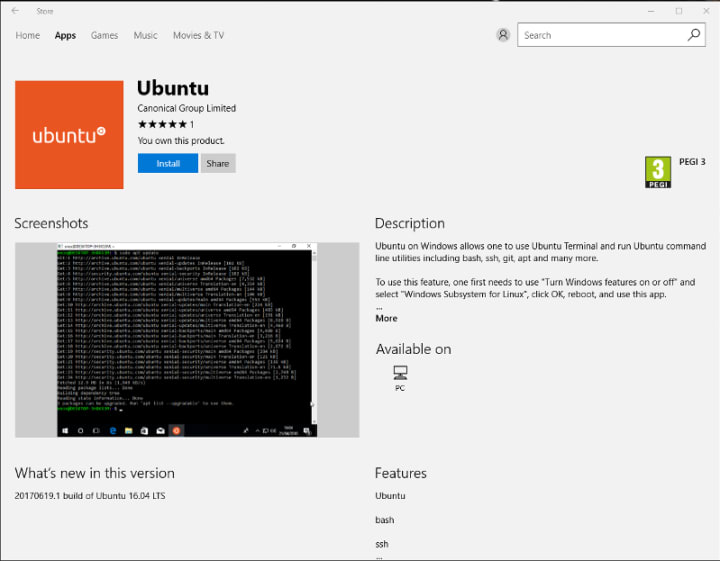
Our team and Microsoft recently released Ubuntu as a Windows app store application! If you toyed with the “bash on Ubuntu on Windows” version before and would like to try the latest and greatest, read on!
Saving your data

If your “bash on ubuntu on windows” environment has some data you’d like to keep, make sure you back it up now. The uninstall process will nuke everything.

Uninstall the old way

This is relatively simple. Opening a command line (cmd.exe) terminal and typing

lxrun /uninstall

will destroy your previous environment.

Installing the new way

To find the app in the Microsoft store, just type “Ubuntu” in the search bar. Click install. Voilà!


Related posts

What’s new in security for Ubuntu 26.10?

Ubuntu 26.10 “Stonking Stingray” arrives at a time when AI tools are accelerating vulnerability discovery. Patching faster is essential, but the resilience of the underlying...

Confidential computing in the real world: finding your use case

Confidential computing is essential when an organization needs to process sensitive data on infrastructure where the operators should not have access to it. You might have seen...

AI infrastructure for telcos

Why moving from pilots to production changes the platform Artificial intelligence has moved beyond the demonstration phase. Telco operators are already exploring it for fault...

Canonical named a Challenger in the 2026 GartnerⓇ Magic Quadrant™ for Server Virtualization Platforms

Canonical has been recognized as a Challenger in the 2026 GartnerⓇ Magic Quadrant™ for Server Virtualization Platforms. The inaugural edition of the report provides an...